

Upkeepr Version 1.4 Release Notes
Date: Tuesday, 1 September 2020
Location: Alexandria, VA, USA
Summary
Version 1.4 contains a new feature and some small bug fixes. You can now capture unique information about an activity just like you do with items. We cleaned up the look and feel and included a few bug fixes, too.
New Features:
- Custom Information Fields for Activities:
Now, you can tailor an Activity record just like you can an Item. The Edit Activity page contains a new section called Activity Info that lets you create and name your own fields for each Activity. In previous versions of Upkeepr, the Activity’s “Description” field was useful because it was a catch-all field that let you store a lot of information about an activity. Version 1.4 still has a Description field, but now you can take information you might have saved in Description and move it to custom fields. For example, if you want to record the type and weight of oil you use for an oil change, you can create custom fields labeled Type and Weight and even capture details like your Filter and Odometer reading in their own fields.
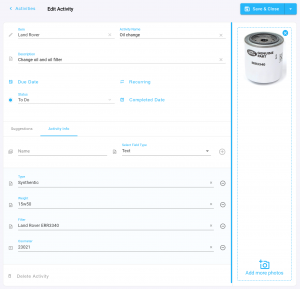

- As with Item, you have four types of Custom Fields for Activities:
- Text: Enter any combination of letters, numbers, or symbols.
- Number: Enter any number and treat the value as a real number rather than simply text.
- Date: Enter a date or pick a date from a pop-up calendar.
- Switch: Enter a true/false attribute of a record. If switched on, the value is true or yes. If switched off, the value is false or no.
Improvements:
- More consistent look and feel:
We continue to improve the styling and consistency across the pages and controls in the app. Please let us know if you see anything that’s really annoying.
Bug Fixes:
- “Oops” page appears less frequently:
When you’ve been logged in for a while, we now update your security information silently, so your edits are not lost or browsing disrupted.
- iPhone Safari layout:
We noticed some layout issues in Safari on the iPhone, especially the width requiring you to pan side to side. We’ve cleaned this up and everything should be beautiful now.
Known Issues:
- Error page still appears after login:
Most people see a brief error page immediately after login while we establish a secure connection to the cloud. We are working on a fix to make this a less jarring user experience.